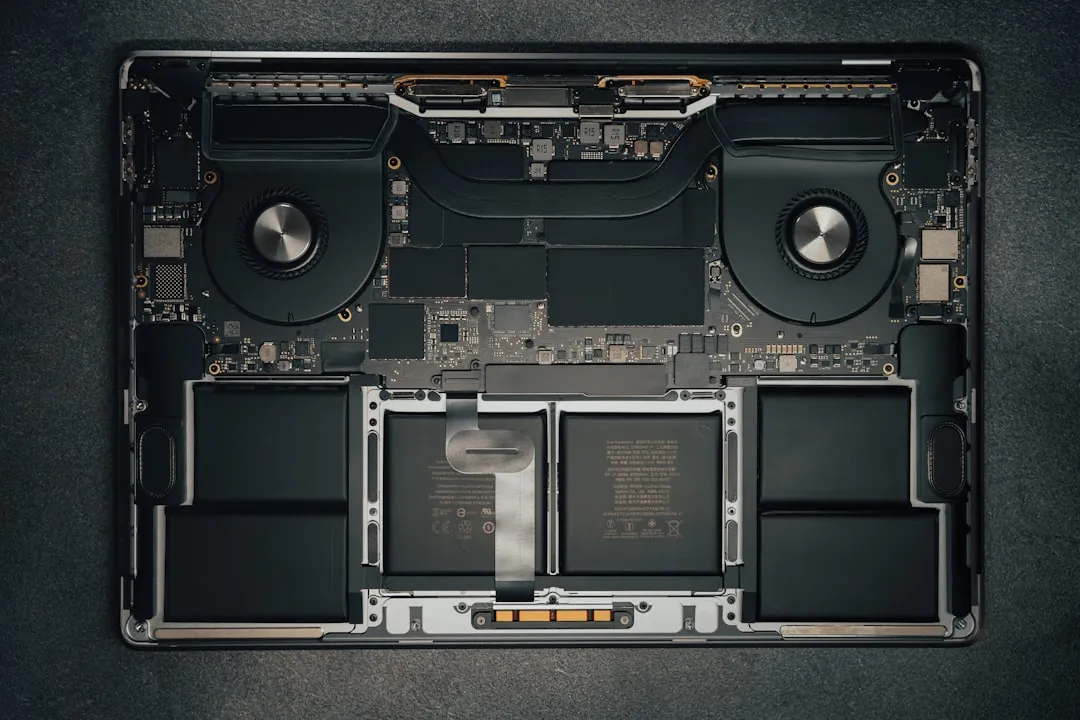
The M4 MacBook Pro is a thermal paradox. Apple’s transition to its own silicon promised a world where thermal throttling was a relic of the Intel era. Yet, as the M4 series pushes transistor density to the limit, we’ve returned to a familiar reality: high-performance silicon generates heat, and the thin chassis of a portable workstation is an unforgiving environment. When your machine slows down during a render or a sustained compilation, it isn't just a "bug"—it’s a physical law being enforced.
The Reality of Thermal Management in Apple Silicon
To understand why your M4 MacBook Pro is throttling, you must discard the marketing imagery of cool, quiet performance. The thermal architecture of the M4 is vastly superior to the M1, but the power draw has scaled accordingly. Under load—specifically tasks like 8K video export in DaVinci Resolve or heavy Xcode indexing—the SoC (System on a Chip) can reach junction temperatures where the internal firmware dictates a clock speed reduction to prevent physical degradation.
Unlike the old Intel MacBooks where you could hear the fans screaming from across the room, the M4 series employs a more "conservative" fan curve. This is an intentional design choice: Apple prioritizes acoustics over raw burst performance. If you are noticing dropped frames or sluggish responsiveness, it is often because the system is prioritizing surface temperature management over sustained peak throughput.
Identifying the Symptoms: Is It Really Throttling?
Before you start tearing down your device or installing aggressive fan-control utilities, we need to verify the bottleneck. Not every lag is thermal.
- System Stutter vs. Thermal Throttling: If your Mac slows down immediately upon opening an app, that is likely an indexing issue or a memory pressure spike (check Activity Monitor). Thermal throttling, conversely, follows a predictable pattern: performance is stellar for 5-10 minutes, then gradually degrades as the internal heat soak exceeds the dissipation capacity of the vapor chamber or heat sink.
- The Power Delivery Factor: Are you using a third-party USB-C hub that isn't PD (Power Delivery) compliant? If the MacBook isn't receiving a consistent voltage, the PMIC (Power Management Integrated Circuit) may throttle clock speeds to prevent an unstable current draw, a scenario that can also manifest as fast battery drain in other devices. This is a common, often overlooked "thermal" symptom that is actually an electrical issue.
The Thermal Efficiency of M4 vs. M4 Pro/Max
The thermal profile differs significantly between the base M4 and the higher-tier M4 Pro/Max variants. The base M4 utilizes a single fan design in some configurations, whereas the Pro/Max models utilize a more robust dual-fan setup.
We see consistent reports on forums like Hacker News and the MacRumors forums regarding the "M4 Pro thermal envelope." A user thread titled “Why does my render drop by 30% after 15 minutes?” often highlights a specific misunderstanding: the difference between Burst Performance and Sustained Performance. Apple optimizes for the former to make the UI feel "snappy," but this leads to a steep performance cliff during long-duration heavy lifting, much like other high-performance devices require strategies for overheating mitigation during sustained use.
Field Report: The "Workaround" Culture and Its Discontents
A common "fix" floating around GitHub is the use of third-party tools like Macs Fan Control or TG Pro. By manually overriding the SMC (System Management Controller) and forcing the fans to maximum RPM, you can delay the onset of thermal throttling.
The Counter-Criticism: Engineering teams often warn against this. Forcing fans to 6,000 RPM 24/7 doesn't just increase noise; it accelerates the accumulation of dust in the intake vents and can lead to premature bearing wear. Furthermore, if you are running software that forces the fans to spin, you are essentially fighting the OS firmware. If the firmware believes the SoC is safe, but you are forcing the fans, you might be cooling the outer chassis while the internal components stay relatively stagnant.
- Common User Complaint: "I set the fans to max, but the M4 Pro still throttles."
- Engineering Reality: The bottleneck in the M4 series is often the heat transfer interface, not just the airflow. You cannot "fan-cool" your way out of a saturated thermal paste application or a contact pressure issue between the heat sink and the silicon.
Professional Strategies for Sustained Peak Performance
If your workflow involves sustained CPU or GPU utilization (e.g., game development, 3D rendering, large-scale data processing), follow these protocols rather than relying on aggressive fan hacks:
- Elevated Workflow: Never use a MacBook Pro flat on a desk during heavy workloads. Use an aluminum riser. Even 2-3 inches of clearance improves convective cooling significantly. The intake vents at the side of the chassis rely on ambient air; choking them is the fastest path to a 20% performance drop.
- High-Power Mode (macOS Settings): For M4 Pro and Max models, ensure the "High Power Mode" is toggled on when plugged into AC power. This allows the system to run the fans more aggressively to maintain peak clock speeds for longer durations.
- Monitor the Thermal Pressure: Use
powermetricsin the terminal to see what the system is actually doing.- Command:
sudo powermetrics --samplers cpu_power,gpu_power - This will show you the exact wattage and frequency of your cores, allowing you to correlate drops in clock speed with specific power limits.
- Command:
The Fragmentation of Thermal Tolerance
One of the most persistent frustrations is the inconsistency of thermal performance across different M4 models. A user on a Discord developer server noted, "My 16-inch M4 Pro runs cooler than my colleague's 14-inch, even with the same workload."
This isn't necessarily a "defect." It’s physics. The 16-inch model has more surface area for passive heat dissipation. The 14-inch chassis is thermally "tighter." When buying a machine for professional production, this is the most critical unspoken factor. If your career depends on 24/7 render times, the 14-inch model is physically disadvantaged by its own size.
The Danger of "Dark Patterns" and Over-Maintenance
There is a subset of the community that advocates for "re-pasting" the M4 with liquid metal. Avoid this at all costs. The factory thermal interface material (TIM) is specifically engineered to handle the microscopic gaps between the SoC package and the cold plate. Replacing this with third-party paste often leads to worse performance because you cannot replicate the exact pressure and spread required by Apple’s high-tolerance manufacturing.
Furthermore, do not use canned air to blast your vents while the fans are spinning. The fans act as generators when spun by forced air, and this can induce a reverse voltage into the logic board, potentially damaging the SMC. Always hold the fan blades steady if you are cleaning the interior.
Assessing the Economic and Operational Impact
When an M4 MacBook Pro throttles, the "cost" is not just a slower export. It’s an opportunity cost. If you are a studio-based editor, losing 15 minutes of render time per hour adds up to nearly two hours of lost production time over an eight-hour day.
- The Ecosystem Conflict: Apple pushes the M4 as a "desktop-class" chip, but the chassis hasn't changed to accommodate the thermal density required for true desktop-level sustained performance.
- Trust Erosion: Users who paid premium prices for the M4 Max feel betrayed when a $4,000 laptop performs like an M4 Pro after 20 minutes of stress. The disconnect between the "M4 is faster than Intel" marketing and the "thermal limits" reality is the single biggest point of friction in the professional user base.
Checklist for Thermal Management
- Baseline Test: Run a benchmark like Cinebench R23 or Geekbench 6 (Multi-Core) for 30 minutes. If the score drops by more than 15% between the first and last run, you have a genuine thermal saturation issue.
- Workplace Audit: Are you near a heater? Is your Mac in a direct sunlight patch? Is your desk surface porous (wood/fabric) or conductive (glass/metal)? Conductive surfaces help; porous surfaces insulate.
- Software Hygiene: Check for background processes using
topin the terminal. Often, a runaway Chrome tab or an unoptimized cloud-syncing service (like Dropbox or Google Drive) is creating unnecessary heat, leaving less thermal headroom for your main application.
FAQ
Is it normal for my M4 MacBook Pro to feel hot to the touch?
Will using a cooling pad actually help?
Does "High Power Mode" hurt my battery longevity?
Why doesn't Apple just make the fans faster?
I heard that updating macOS fixes thermal issues. Is that true?
Can I bypass thermal throttling with software?
Bu makale affiliate linkleri içermektedir.